 OdoMate
Yes — in a like-for-like test on the same feature (project task checklists for Odoo 19), an AI-generated module by OdoMate matched a popular Apps Store module on every core feature and added a 12-case automated test suite, record-rule security, and two safeguards the popular one doesn't ship. Below is the code-level evidence, side by side, with nothing hand-polished after generation.
We wanted to answer a fair question we hear from Odoo partners and in-house teams alike: can a generated module actually stand next to something real people already install by the thousands? So we picked a well-trodden problem, generated a module for it with OdoMate, and lined it up against one of the most-installed community modules that does the same job.
The setup: same job, two builds
Both modules attach reusable, multi-step checklists to project tasks — pick a template, load its steps onto a task, move each step through To Do → In Progress → Done/Cancelled, and watch a progress bar fill in.
- The reference: Cybrosys' Project Task Checklist — a free, established community module. Its Apps Store listing shows 3,136 installs as of 20 July 2026. It's a legitimate, widely-used solution from a vendor with a long catalogue.
- The generated one: OdoMate's Project Task Checklists — specified, generated, and automatically tested by OdoMate, then security-reviewed before public release. No line of its code was rewritten by hand for this comparison.
Both target Odoo 19 Community, depend only on project, are free and open-source, and ship a full Apps Store description page. This isn't paid-vs-free or Enterprise-vs-Community — it's the same job, built two ways.
Where they're the same
Credit where it's due: for the core promise, these modules are close.
- Reusable checklist templates you manage in a library
- The same four step states, with inline Start / Done / Cancel buttons
- A live progress bar on the task and a progress column in the task list
- A light, additive footprint (both just extend
project.task)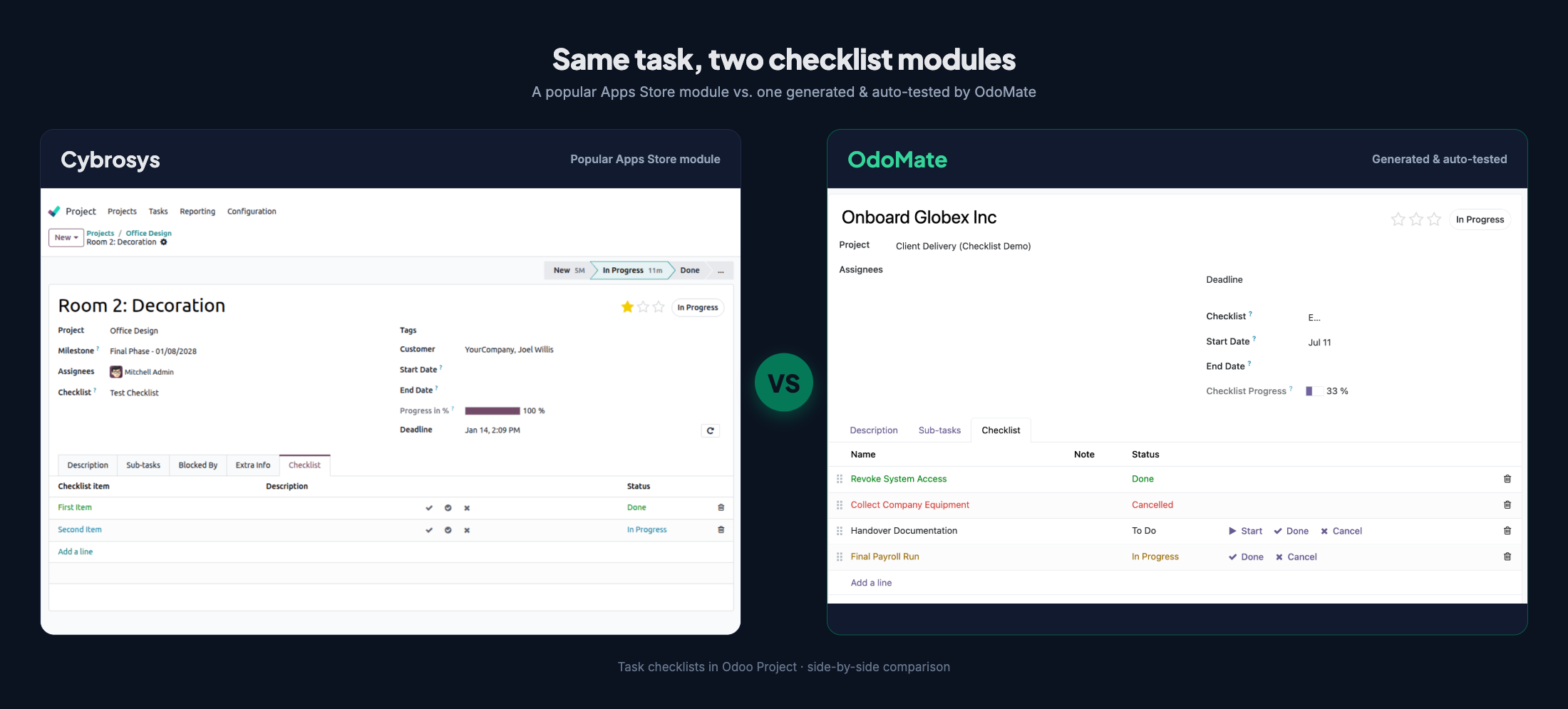
Neither ships translation files, and neither isolates templates per company. If all you need is straightforward checklist tracking, the reference module has been doing that job in production for a long time.
Where the generated module goes further
The differences aren't in the headline feature — they're in the engineering underneath it. We reviewed both modules file by file across ten topics (features, data model, code correctness, security, Odoo/OCA conventions, testing, UX, performance, docs, licensing) — 74 dimensions in all. Here's a grouped, curated view; every row is traceable to the modules' own source.
| Topic | What we checked | OdoMate | Cybrosys |
|---|---|---|---|
| Core features | Templates, 4 step states, inline buttons | ✅ | ✅ |
| Core features | Live progress bar + task-list column | ✅ | ✅ |
| Testing | Automated test suite | ✅ 12 cases | ⬜ none |
| Testing | Demo data to evaluate on install | ✅ | ⬜ none |
| Security & access | User vs. manager permission split | ✅ | ⬜ flat, all-user |
| Security & access | Record rules scoping data to task visibility | ✅ 2 | ⬜ none |
| Correctness | Progress counts only completed (cancelled excluded) | ✅ | 🟡 |
| Correctness | Computes stored + dependency-tracked | ✅ | 🟡 non-stored |
| Work-safety | Confirm before replacing a started checklist | ✅ wizard | ⬜ none |
| Work-safety | Auto-stamped, self-healing start/end dates | ✅ | ⬜ manual |
| Engineering | Indexed keys, batch-safe create/write | ✅ | 🟡 |
| Data model | Explicit ordering, ondelete, copy rules |
✅ | 🟡 |
| UX | State-aware, labelled action buttons | ✅ | 🟡 icon-only |
| Packaging | Template archiving + end-user guide | ✅ | ⬜ |
| Docs | README + field-level help | ✅ | ✅ |
| Docs | Maintained changelog / release notes | 🟡 | ✅ |
| Adoption | Field-proven install base | 🟡 new | ✅ 3,136 |
✅ full · 🟡 partial · ⬜ none. This is a curated slice of the full 74-point review; the modules are genuinely equal on the core features, and the reference module leads on adoption and a maintained changelog.
It ships with a test suite
The generated module ships with a 12-case automated test suite (tests/test_project_checklist.py) that exercises the parts most likely to break:
test_apply_on_empty_task_copies_lines
test_switch_without_progress_replaces_immediately
test_switch_with_progress_waits_for_confirmation
test_replace_wizard_confirm_replaces
test_progress_excludes_cancelled
test_progress_zero_when_all_cancelled
test_start_date_stamped_on_first_in_progress
test_start_date_not_overwritten
test_end_date_stamped_on_completion
test_end_date_self_heals_when_reopened
test_end_date_cleared_on_confirmed_replace
test_template_line_count
OdoMate generates and automatically tests each module as part of its workflow; this module's generation record reports 12 of 12 unit tests green. The reference module ships no tests/ directory — which is common for Apps Store modules, but it means there's nothing you can re-run on your own build to confirm behaviour after an upgrade. Tests are a first-class part of the Odoo developer framework precisely because that's where regressions get caught.
Access control follows task visibility
The generated module separates permissions: internal users can read the template library, but only Project Managers can edit it (6 access rules). It also ships two record rules so a user only sees checklist steps for tasks they're already allowed to see — checklist data can't quietly widen access beyond a user's existing task visibility. The reference module grants every internal user full create/read/write/delete on all its models and ships no record rules. For a personal tracker that's fine; for shared project data with confidentiality settings, the scoped model is the safer default.
It asks before it throws away your work
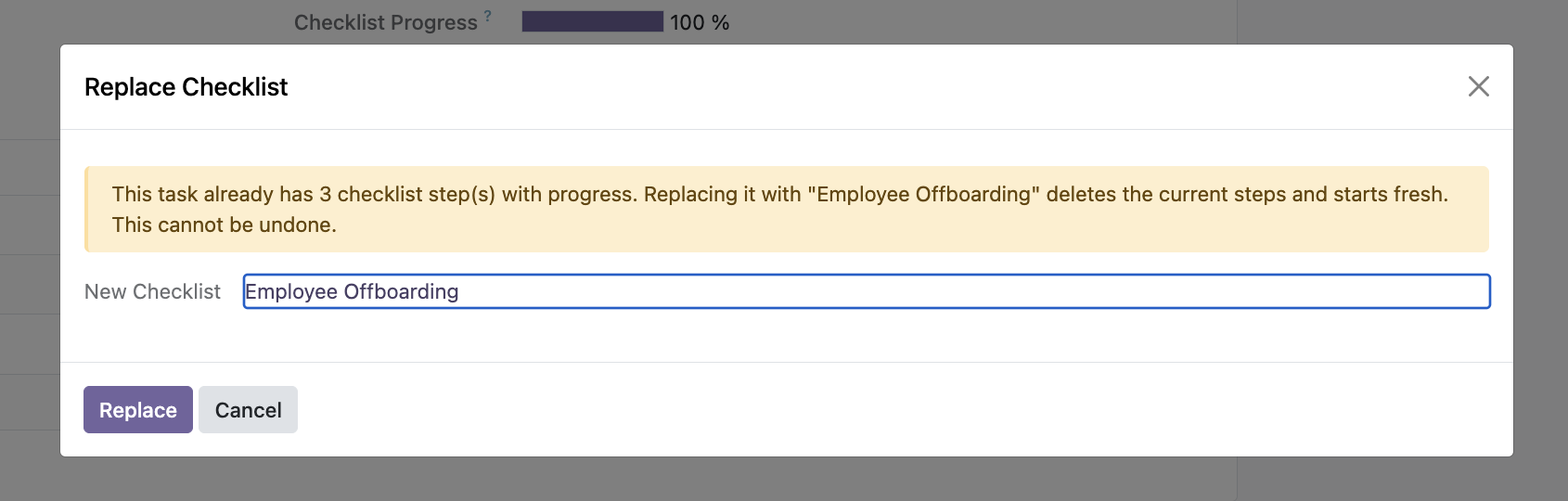
Swap the checklist on a task that already has progress, and the generated module opens a small confirmation wizard before discarding the current steps. It's a guardrail against losing work with one wrong dropdown pick — a small thing that matters once real people are using it.
Progress counts only finished work
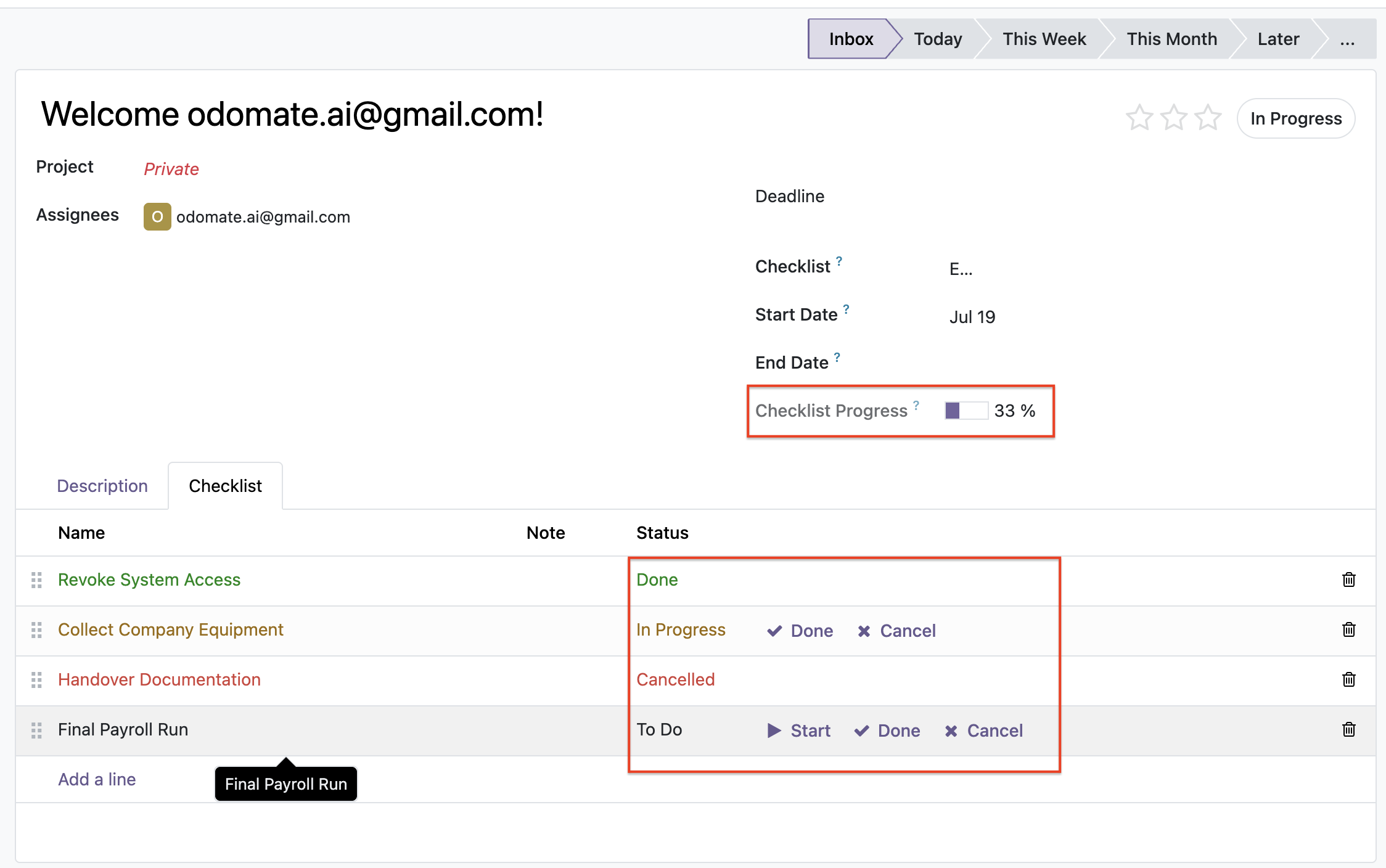
The generated module computes progress as done ÷ (total − cancelled), stored on the task and recomputed reactively as steps change — so cancelling a step you're not going to do can't stop you reaching 100%. It also stamps the task's start date the first time a step begins and its end date when the checklist completes, clearing that end date automatically if the work reopens. These are the kinds of details a developer usually adds by hand on a second pass; here they came out of the generator with tests around them.
What this doesn't prove
We're keeping this honest, because a technical audience can smell the opposite:
- This is one module on one common problem. It's evidence that OdoMate can produce a solid, well-tested module — not a claim that every generated module clears this bar, or that generation replaces engineering judgement.
- Generated code still needs human review. We treat OdoMate's output as strong Python code that a developer should review before production. For this showcase module, our CTO ran a security-focused review before public release; the generated code was not hand-rewritten to make it look better.
- Install count is real-world proof the reference has and we don't. 3,136 installs means the Cybrosys module has been exercised by real teams for a long time. Ours is newly published. Test coverage is not the same thing as field-proven adoption, and we're not pretending it is.
What this actually proves
This isn't a "buy this module instead of that one" story. Both are free, both install, both do the core job — and the reference module has real-world mileage a newly published module can't claim. Picking a checklist module was never the point.
The point is how the generated module got here. No developer hand-built it over several passes and no one polished the code afterwards — it was generated from a plain-language specification and it automatically tested itself, and arrived with record-rule security, replace-safety, precise progress and date logic, and a test suite you can re-run yourself. That's the real result: evidence that a platform can turn a clear specification into a stable, functional, conventionally-structured Odoo module — one you can inspect line by line before you trust it.
So the question worth asking isn't "which checklist module should I install?" It's "can I generate the modules my own project needs, to this standard?" If you want to see how a precise spec drives that kind of output, we broke down the six things every Odoo module spec should answer. We later ran the same exercise against a vendor module with 21,000 downloads — a generated discount module versus the vendor's — and wrote up where each one goes further. And when Odoo 20 shipped in September, we generated this same module fresh on the new version — see whether OdoMate already supports Odoo 20.
Curious how this works on a spec of your own? We're onboarding early beta users in small cohorts — inspect the module, then request early beta access.
FAQ
Can an AI-generated Odoo module include automated tests? Yes. The generated module in this comparison ships with a 12-case automated test suite covering its templates, checklist application, progress calculation, and date-stamping. OdoMate generates and automatically tests each module as part of its workflow, and the test files are part of the downloadable output so you can re-run them yourself.
Is a generated module production-ready as-is? Treat it as strong Python code that needs human review before production. For official showcase modules, OdoMate's CTO performs a security-focused review before public release, without rewriting the generated code.
Does having more installs make the popular module better? Not automatically, but it's meaningful evidence. A high install count (3,136 for the reference module) means real teams have exercised it over time — something a newly published module can't claim. It's a different kind of assurance than automated test coverage, and both are worth weighing.
Are both modules free and Community-compatible?
Yes. Both target Odoo 19 Community, depend only on the project module, and are free and open-source (the generated module under LGPL-3, the reference under AGPL-3).
Was the generated code edited by hand for this comparison? No. The module shown is OdoMate's actual generated output, security-reviewed before release but not manually rewritten or improved for publication.