 OdoMate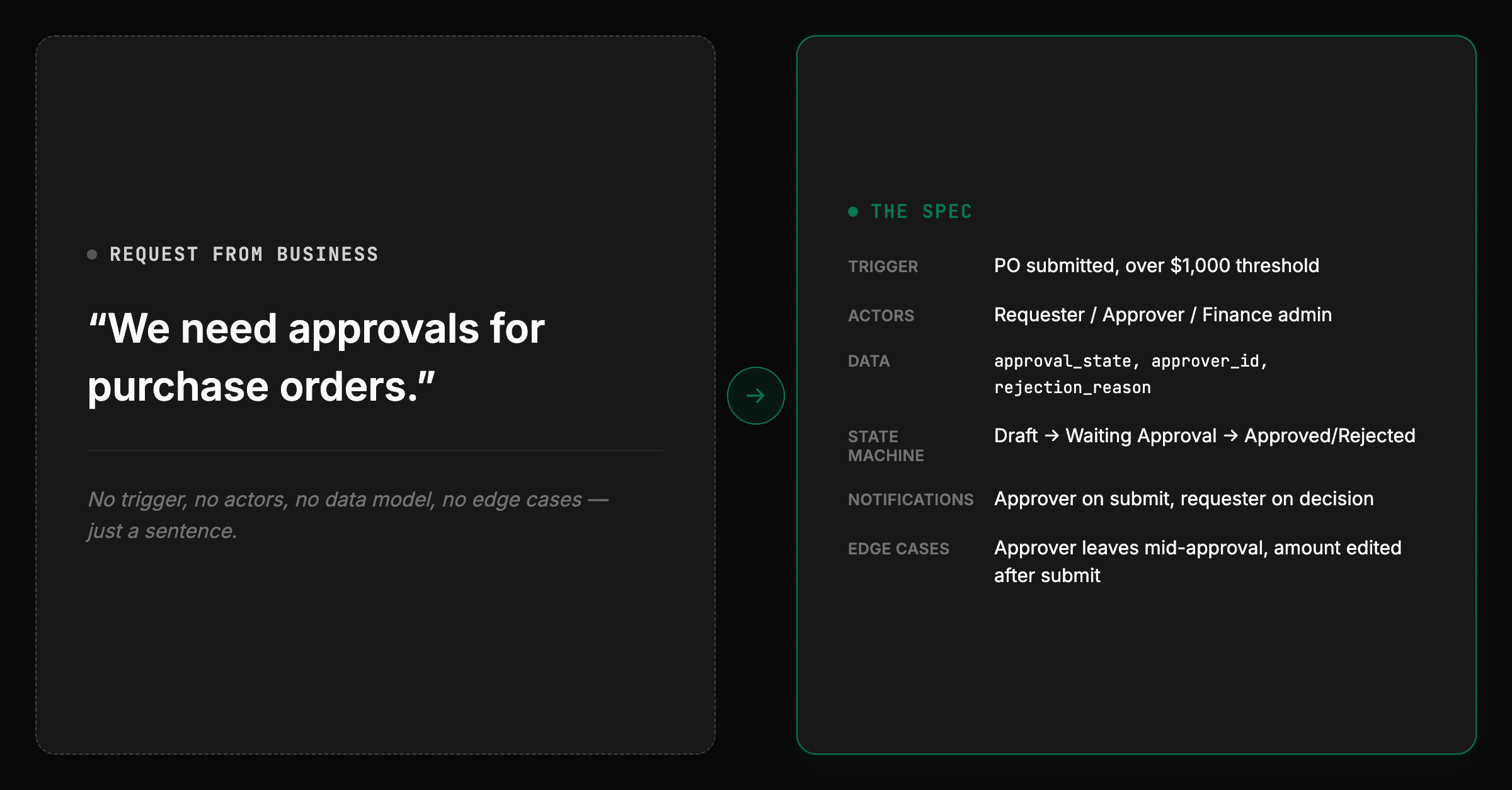
If you've ever picked up a "quick" Odoo customization and watched it turn into three weeks of back-and-forth with the client, the problem probably wasn't the code. It was the spec.
Most custom-module rework doesn't come from bad Python. It comes from a request that sounded clear in a meeting and turned out to be missing something nobody thought to ask: what happens if the approver is on leave? What status does the record sit in while it waits? Who gets told when it's rejected? By the time those questions surface, they surface as a change request — after the module is half-built.
In short: a solid Odoo module specification answers six things before anyone opens an IDE — the trigger, the actors, the data, the state machine, the notifications, and the edge cases. The rest of this piece walks through each one, then rewrites a real one-liner request using all six.
One scope note before the framework: this is built for workflow and approval-style modules — the kind with actors, states, and notifications. A reporting module needs a data source, filters, and layout, not a state machine. An integration needs endpoints, auth, and sync direction, not actors. If that's what you're speccing, treat this as a partial fit and look for a workflow-shaped example elsewhere.
One more check before the framework: make sure a module is the right tool at all — what are your options for customizing Odoo? walks through the five, starting with a setting.
The 6 things every Odoo module spec should answer
1. Trigger
What action or event starts the workflow? A button click, a scheduled job, a record reaching a certain field value, an email arriving? "Starts when someone clicks submit" and "starts when a purchase order exceeds $5,000" are different modules.
2. Actors
Who does what? Not just "the user" — which role: requester, approver, admin, an external vendor via portal access? What can each of them see and do that the others can't? (In Odoo terms, this is where access rights — ir.model.access plus record rules — turn into a spec item, not just a role label. "The requester can't approve their own PO" is a record rule, and it's worth writing down explicitly rather than assuming it falls out of the role names.)
3. Data
What fields does this actually need, on what model, with what constraints? A required date, an optional note, a computed total, a many2one to an existing record? This is where "just add an approval flag" quietly becomes six fields and a related model.
4. State machine
What statuses can the record be in, and which transitions between them are actually allowed? Draft → Submitted → Approved is easy. Can Approved go back to Draft? Can two people approve the same record? What happens when someone cancels partway through? This is usually the single most under-specified part of any request.
5. Notifications
Who gets told, what, and when? On submit, on approval, on rejection, on a deadline passing? Email, Odoo's internal chatter, both? Silence here just means someone finds out three days late, in person, annoyed.
6. Edge cases
At least three named scenarios where the happy path breaks. Not "handle errors gracefully" — specific ones: what if the approver is also the requester? What if the record is edited after it's submitted but before it's approved? What if the amount changes?
A spec that answers all six isn't necessarily longer than the one-line request that started it. It's just precise instead of vague — and that precision is what removes much of the avoidable implementation work later, because the questions get answered once, in writing, instead of one at a time, mid-build.
Before and after: a real one-liner
Here's a request almost every Odoo partner or in-house BA has received in some form:
We need approvals for purchase orders.
That's a complete sentence and an incomplete spec. Worth saying up front: Odoo already ships basic two-step PO approval out of the box (Purchase → Configuration → double validation, gated on an amount threshold), and Enterprise has a generic Approvals app on top of that. This example assumes you've hit the edges of what those cover — per-department approvers, escalation, reverting an order after a post-approval edit — and genuinely need a custom flow, not a configuration checkbox. Here's the same request run through the 6 questions.
Trigger
A Purchase Order moves from Draft to "Waiting Approval" when the requester clicks Submit for Approval. Orders under a configurable threshold (default: $1,000) skip approval and confirm automatically.
Actors
- Requester — creates and submits the PO. Cannot approve their own PO, regardless of role (enforced as a record rule, not just left to convention).
- Approver — a user with the "PO Approver" security group, assigned either by a fixed rule (department manager) or a configurable threshold rule (PO over $10,000 requires a second, senior approver).
- Finance admin — can reassign an approver if the original one is unavailable; sees all pending approvals across departments.
Data
approval_state(selection: draft / waiting_approval / approved / rejected / confirmed) — layered alongside the PO's native state rather than replacing it, kept separate here so the approval logic is easy to follow. A production build would more likely fold this into the existing state field, or drive it from a computed stage, to avoid two states drifting out of sync.approver_id(many2one, res.users, domain-restricted to the PO Approver group)approval_threshold(config setting, per company)rejection_reason(text, required when state → rejected)approval_date/approved_by(for audit)
State machine
Draft → Waiting Approval → (Approved → Confirmed) or (Rejected → back to Draft, editable). Cancelled is reachable from Draft or Waiting Approval directly — but not from Confirmed, since unwinding a fully processed PO needs Odoo's standard reversal flow, not this approval gate. A PO edited after Waiting Approval automatically reverts to Draft and requires re-submission — it cannot stay "approved" against a changed order.
Notifications
- Approver: notified (chatter + email) the moment a PO enters Waiting Approval.
- Requester: notified on approval or rejection, with the reason if rejected.
- Finance admin: notified if a PO sits in Waiting Approval more than 3 business days (escalation).
Edge cases
- Approver is deactivated or leaves the company mid-approval → Finance admin gets an automatic reassignment prompt.
- PO amount is edited after submission → order reverts to Draft (see state machine above); prevents "approve now, inflate later."
- Two qualifying approvers exist for the same PO → first action wins; the other sees "already actioned" instead of being able to double-approve.
- Multi-currency PO where the threshold is defined in company currency → converted at the PO's exchange rate at submission time, not at approval time.
Notice what changed. The one-liner and the rewrite describe the same business need — "approvals for purchase orders" — but only one of them can actually be estimated, built, and tested without three rounds of "wait, what happens if…" A developer reading the six-part version can start immediately: the fields, the states, and the notification rules are already decided. A developer reading the one-liner has to either guess or go back and ask — and every one of those guesses is a place a module can come back for rework.
What this doesn't fix
A precise spec removes avoidable rework — the kind caused by ambiguity that could have been resolved on paper. It doesn't remove all rework. Some edge cases only show up once real users touch the module (a workflow that looks complete on paper can still surprise you in week two of actual use). And writing a good spec still takes someone who knows enough about the business process to name the actors, thresholds, and edge cases correctly — the structure doesn't invent that knowledge, it just gives it somewhere to go before the build starts, instead of during it.
FAQ
What should an Odoo module specification include? At minimum, six things: what triggers the workflow, which actors are involved and what each can do, what data fields it needs, what states the record can move through, who gets notified and when, and at least three named edge cases where the normal flow breaks.
Why do custom Odoo modules need so much rework? Usually not from coding mistakes — from specs that sound complete in a meeting but leave out edge cases, notification rules, or state transitions that only surface once the module is half-built.
Does this framework apply to every type of Odoo module? No. It's built for workflow and approval-style modules. Reports, integrations, and pure UI changes need their own spec shape — a report needs a data source and filters, not a state machine; an integration needs endpoints and sync direction, not actors.
Is Odoo's built-in purchase approval enough, or do I need a custom module? Odoo's native two-step approval with a configurable amount threshold covers basic cases. A custom module earns its keep once you need what native Odoo doesn't do out of the box — per-department approvers, escalation, or reverting to Draft after a post-approval edit.
What's the fastest way to check if a spec is ready to hand off? Run it against the Odoo Module Specification Template + AI-readiness checklist below — the same six gaps predict rework whether you're handing the spec to a developer or a spec-driven generator.
Where this connects to OdoMate
We built OdoMate's spec assistant around exactly this structure. When you describe a business need in plain English, it asks follow-up questions grounded in these six fundamentals — trigger, actors, data, state machine, notifications, edge cases — before generating anything, instead of leaving them for a developer to discover mid-build.
What that looks like on a real run, when a requirement asks for something Odoo already does: why the generator didn't build the feature we asked for.
Want to work through this on a spec of your own first? Grab the fillable Odoo Module Specification Template + AI-readiness checklist — same six sections, ready to fill in.
Curious how this works on a real spec? Request early beta access.
We're reviewing requests on a rolling basis and onboarding in small cohorts.