 OdoMate
Odoo Studio runs Python, builds models, and configures automations — not a toy, but a powerful customization tool that doesn't require deep programming skills. Even so, it has real limits. It can't keep a calculated number correct on its own, no matter what order things happen in. It can't guarantee that a failed step won't leave a half-finished record behind. And for some events — a record simply being viewed, or exported — it has no path at all.
Here's exactly where that line sits, in three real, published modules — plus the more expensive mistake that only shows up after you've already hit it.
Key takeaways
- Studio can build most of a feature. The real question is where the edge of that feature sits — not whether Studio is "good enough" in general.
- The three examples below sit at increasing distance from what Studio can express: mostly there, right at the edge, and no path at all.
- The costlier mistake isn't hitting Studio's ceiling — it's building custom code that quietly depends on a field Studio created, which breaks the moment you rebuild the database.
- Every example is a real OdoMate-generated module, published on GitHub with the plain-English specification that produced it, so you can compare what was asked for to what was built.
What Can Odoo Studio Actually Build?
Odoo Studio is an Enterprise app — installing it on the Standard plan automatically moves the subscription to the Custom plan — that edits your database through a visual interface. It is genuinely capable. Studio can:
- create models and fields
- build list and form views
- set up security rules
- write automation rules that run real Python behind the scenes
Every change is stored as a record — in tables like ir.model.fields and ir.ui.view — which Odoo's own documentation confirms is what makes a Studio customization exportable as a module, even though nobody wrote a line of code to produce it.
That covers a genuinely wide range of requirements. It stops being enough exactly where the next three examples sit.
Where Does Studio's Ceiling Actually Sit?
Capability usually isn't what decides whether Studio fits. Sometimes it is, though. Below are three real requirements: the first mostly fits inside what Studio can do, the second runs right up to its edge, and the third sits fully outside it. All three come from real OdoMate-generated modules, published with the specification that produced them, so you can check the request against the result yourself.
Studio Gets You Most of the Way: Task Checklists
The business need: a checklist with standard steps attached to a project task, one that tracks progress and sets its own completion date. OdoMate generated odomate_project_checklist for exactly that — the checklist template, the individual steps, the states, the list and form views.
Studio covers almost all of that list. Where it stops is a single number: the progress percentage. It has to recalculate itself correctly no matter what order someone completes or reopens steps in — and that's exactly where a Studio-only automation rule falls short, because it only reacts to the transitions someone thought to configure in advance. Build the "step completed" rule and forget its opposite, and reopening an already-completed step leaves the end date stuck on the day it was first marked done — silently wrong, because nothing told Studio to clear it. The real module gets this right: its progress recalculates on every change, in either direction, so the end date only ever shows what's currently true.
The Precise Edge: Automatic Fulfillment
The business need: turn one Confirm click on a sales order into a full run — validate the delivery, create the invoice, post the invoice — without leaving a half-finished trail if something along the way fails. OdoMate generated sale_warehouse_auto_fulfillment for exactly that.
Studio can chain those three steps together with automation rules. What it can't do is guarantee that the whole run either fully completes or fully undoes itself. That guarantee is the entire point of the feature. If invoice posting fails on the last step, a Studio-built chain can leave the delivery already validated and the order stuck half-finished — an orphan shipment with no invoice, or worse, a partial trail nobody notices until someone reconciles the books. This isn't a case of Studio's automations having a bug to fix — it's what happens when you chain declarative actions (update this, create that) with no way to guarantee they all succeed or none do. Studio does let you write raw Python in an Execute Code action, but at that point you're writing custom code with the same maintenance and upgrade exposure as a module, not configuring a point-and-click rule.
No Studio Path Exists: Audit Trail
The business need: keep a record-level history of who did what and when — including things that never show up as a change on the record itself, like a spreadsheet export or someone simply opening a sensitive record. OdoMate generated audit_trail for exactly that.
Studio's automation rules only fire on events like create, update, and delete. A record being read, or exported to a spreadsheet, isn't a trigger Studio has at all.
How Do the Three Examples Compare?
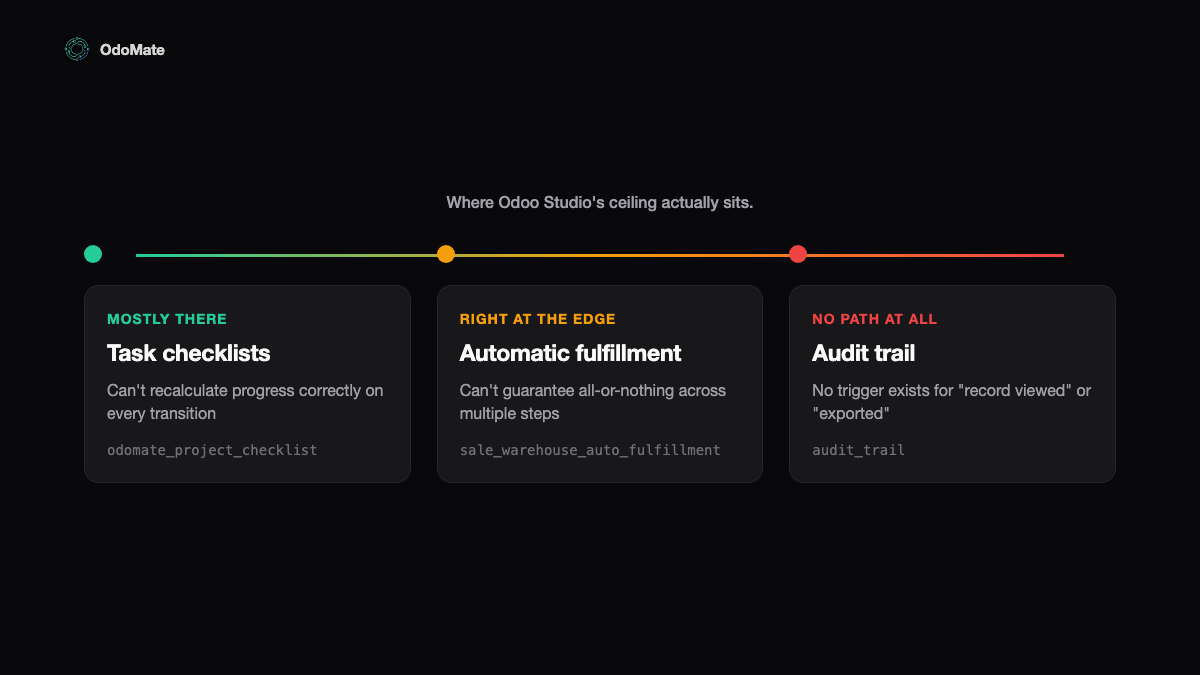
| Example | Does Studio get you there? | What actually breaks | Real module + spec |
|---|---|---|---|
| Task checklists | Mostly | A Studio-only rule leaves a stale, wrong end date when a completed step reopens | odomate_project_checklist |
| Automatic fulfillment | Only the easy chaining | A failed step can leave a half-shipped order or an orphan invoice behind | sale_warehouse_auto_fulfillment |
| Audit trail | No | Exports and record views leave no trace — nothing to react to | audit_trail |
Want the fuller teardown on the first two? We compared the generated checklist module against a 3,000+ download Apps Store equivalent, and put the automatic-fulfillment module head to head with a vendor module with identical features.
What Happens When Custom Code Depends on a Studio Field?
Studio often takes a customization most of the way to done before running into the tool's limit — and that's exactly the point where the temptation appears to bolt on custom code that reads a field Studio created.
It works only because that field exists in that database. A Studio field is a database record, not a line of code, so nothing in a module's manifest can declare that it depends on it. That has real, practical consequences:
- The module installs against a field that isn't there on a fresh database — a staging clone, a new company, a colleague's laptop.
- Rebuilding the environment means replaying the Studio export first, in the right order, before the new code will even install.
- Renaming that field means leaving Studio entirely — Odoo's own docs describe pulling the field from every view, editing its technical name in Settings → Technical → Fields, then re-adding it to each view by hand. Skip that, and the module stays pinned to whatever name got generated from a form label.
- Responsibility for the next upgrade now splits down the middle of one feature: Odoo's side, and yours.
Odoo's own developer documentation backs this up from the other direction. Its guidance on upgrading a database with custom modules is to first make those modules work against an empty database, specifically to catch problems like "studio customization" before they reach production.
The practical rule: pick one side per feature. Configure it entirely in Studio, or build it entirely in a module with its own fields. A module that reads a Studio field is a dependency your manifest and Git history can't see — even the module's own automated tests won't catch it, since the field only exists on databases where someone already ran the Studio export.
How Do You Decide Whether to Use Odoo Studio?
Three questions settle most of it:
- Does the requirement need something to recalculate itself correctly no matter what order things happen in, or hold up when a step fails partway through? If yes, you're past what Studio's automation rules can guarantee.
- Does it need to react to something Odoo doesn't treat as a "change" at all — like a record being read, or exported to a spreadsheet? Studio's automation rules only fire on create, update, and delete. Anything else is a layer its interface doesn't reach.
- If Studio gets you most of the way, will anything downstream read a field it created? If so, decide now whether that piece belongs entirely in Studio or entirely in a module — not split between the two.
None of this says Studio is the wrong choice, or that a custom module always is. It says pick deliberately, and know what you're picking up.
For the fuller picture — five ways to customize Odoo, including the cases where a setting or a ready-made module already covers it — see what your options for customizing Odoo actually are, and the free Odoo customization decision tool that walks through all five and tells you which to start with.
Curious how a requirement like one of these three gets checked against Studio's actual limits, on your own spec? Request early beta access — we review requests on a rolling basis and onboard in small cohorts.
FAQ
Is Odoo Studio available on Odoo Community? No. Studio is an Enterprise app — Odoo's editions comparison marks it unavailable in Community, and it isn't in the Community source tree either.
Can a custom module read a field Odoo Studio created? Technically yes, and it's a bad idea. A Studio field is a database record, not code, so no module manifest can declare a dependency on it. That has real consequences: the module installs on the database where the field exists and fails on a fresh one, rebuilding the environment means replaying the Studio export first, renaming the field means leaving Studio and editing it in the database's technical settings by hand, and responsibility for the next upgrade splits down the middle of one feature. See "What Happens When Custom Code Depends on a Studio Field?" above for the full breakdown.
Does Odoo Studio run real code? Yes. Every model, field, view, and automation rule Studio creates runs on real Python underneath — it just stores the result as database records instead of files.
What can Odoo Studio not do at all? Anything that needs a value to stay correct through unplanned sequences of events, a multi-step process to fully complete or fully undo itself, or a reaction to an event Studio's automation rules have no trigger for at all — like a record simply being viewed or exported. Three real examples are above, each with its published module and specification.
Should I build this in Studio or as a custom module? It depends on the specific requirement, not on Studio's overall quality — Studio is genuinely capable. Check whether the requirement needs the kind of guarantees Studio's automation rules can't give (self-correcting values, all-or-nothing execution, reacting to events Studio has no trigger for), and if you split the work between Studio and a module, don't let the module depend on a field Studio created.